


DLSS 5 Modding in Modern Games
Since the Control mod arrived, I’ve been experimenting with the DLSS 5 .dll files that appear in many titles. The results vary: some games run smoothly, while others produce bizarre artifacts that look like worms under the skin. In the review build of The Blood of Dawnwalker the DLSS channel failed to connect, giving a semi‑Vrakhiri look that relies on undead elegance rather than true motion vectors or scene depth. Early access NBA 2K27 released its files, and modders have turned them into standalone tools that let you inject DLSS 5 into virtually any game.
How the Mods Work
Mods such as RenoDX and the ShortFuse packs make it surprisingly easy to add DLSS 5 to games that never shipped with it. You usually find a Discord invite, download the correct .dll files, and use a ReShade HDR installer (RHI) from GitHub. Running the installer as administrator lets you select the target game, install ReShade, and choose the DLSS tool from the Shaders/Addon menu or the new Neural Rendering section. This automatically places the needed files in the right folders, though the feature is still unofficial and may require extra tweaks to work perfectly.
Performance Impact
DLSS 5 costs a lot of GPU resources. Nvidia says it can drop frame rates by 50‑60 % across the board, and at 4K the hit can be even larger. On an RTX 5090, Control mode runs at about 110 fps with DLSS Balanced 4K Ultra Ray Tracing, but enabling DLSS 5 pulls the frame rate down to under 50 fps. This loss is expected, given that the technology needs extra tensor cores that current‑generation cards don’t have in abundance.
Visual Improvements
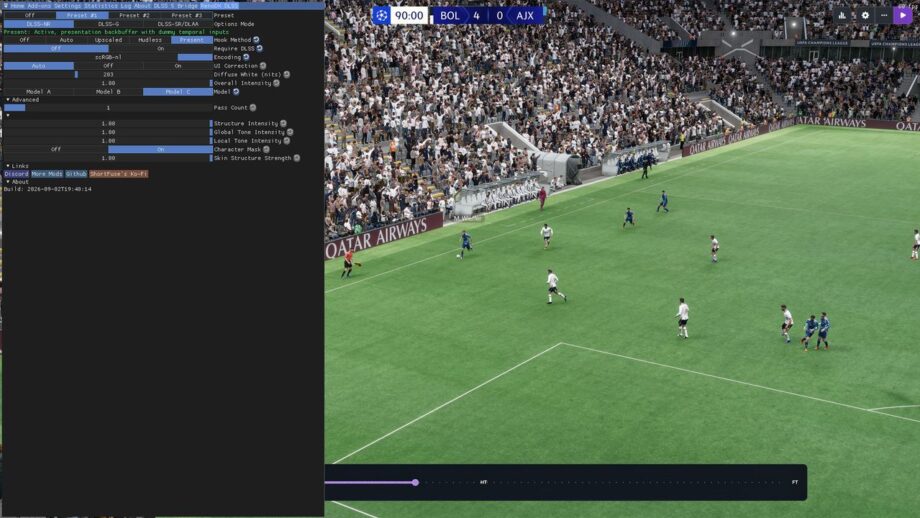
When used moderately—choosing Model C and setting the intensity to 60‑70 %—DLSS 5 can make textures, character models and lighting look sharper than the originals without the oversaturated AI look or unwanted geometry changes. In Football Manager 26 the effect adds more detail to faces, crowds and shadows, turning plastic‑looking players into slightly more realistic avatars, though still far from photorealism. The same technique works on other titles, improving ambient lighting and small‑scale details.
Installation Tips
To get DLSS 5 working, press Home in the game to open the ReShade menu, then switch to the RenoDX tab for the sliders. Remember that official DLSS 5 will be an on/off switch controlled by developers, while the mod gives you fine‑grained control that may clash with the creator’s artistic intent. If a game shows “Waiting,” try swapping between the two RenoDX tools or adjust file placement.
Overall, DLSS 5 offers a powerful visual boost when handled carefully, but it demands a capable GPU and a willingness to experiment with unofficial tools.
