
By using this site, you agree to the Privacy Policy and Terms of Use.
Accept
Gamers Illustrated
  • Home
  • Gaming News
  • Game Reviews
  • Industry News
  • More
    • Opinions
    • Gaming Hardware
    • Trending
    • Guides & Tips
    • Entertainment
    • Features
    • Videos
Reading: Listen To The Radio On Foot in GTA 6 Using Headphones
Font ResizerAa
Gamers IllustratedGamers Illustrated
  • Entertainment
  • Features
  • Game Reviews
  • Gaming Hardware
  • Gaming News
  • Guides & Tips
  • Industry News
  • Opinions
  • Trending
  • Videos
Search
  • Home
  • Gaming News
  • Game Reviews
  • Industry News
  • More
    • Opinions
    • Gaming Hardware
    • Trending
    • Guides & Tips
    • Entertainment
    • Features
    • Videos
Microsoft Alters Windows 95 Hologram After Government Misreads Nude Baby

Microsoft Alters Windows 95 Hologram After Government Misreads Nude Baby

Gamers Illustrated Gamers Illustrated August 25, 2026
  • About Us
  • Contact Us
  • Terms & Conditions
  • Privacy Policy
© Copyright 2026. All Rights Reserved By Gamers Illustrated.
Gamers Illustrated > Blog > Guides & Tips > Listen To The Radio On Foot in GTA 6 Using Headphones
Guides & Tips

Listen To The Radio On Foot in GTA 6 Using Headphones

Gamers Illustrated
Last updated: November 25, 2026 10:17 am
By Gamers Illustrated 2 Min Read
Share
Listen To The Radio On Foot in GTA 6 Using Headphones
SHARE

How to Get and Use Earbuds in GTA 6

Grand Theft Auto 6 introduces a new way to enjoy the radio while on foot: you can purchase earbuds for the protagonists Jason and Lucia. This lets them listen to stations through their phones, so you won’t miss a favorite track just because you’re walking.

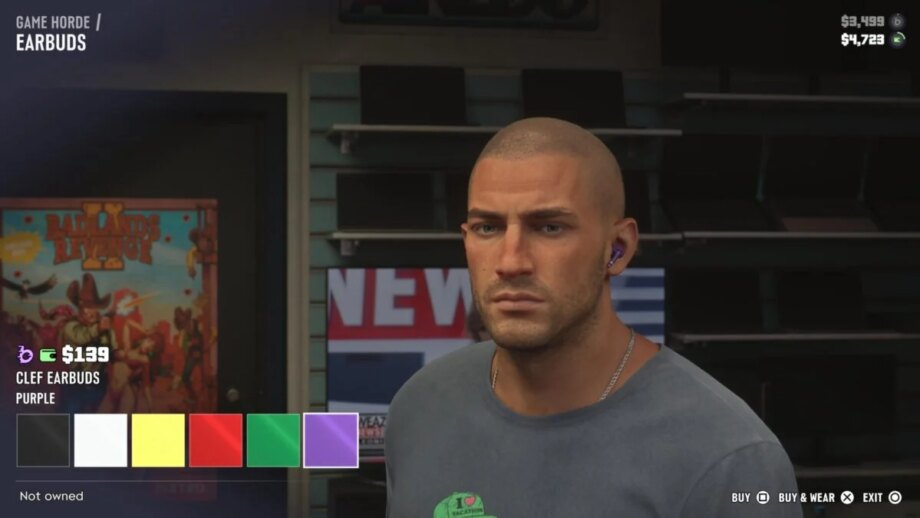
To start, locate any store that displays the headphone icon. In this guide we’ll use Game Horde as the example shop. Head there and approach the earbud case to make the purchase.

The earbuds come in several colors, and you can give Jason a sporty purple look. They appear on the character model, but they’re subtle enough that you might not notice them unless you look closely.

Equipping the earbuds works like putting on a mask or hat. Open the item menu by holding L1 (or LB) and pressing R1 (or RB), then use the right analog stick to highlight the headphones and press X (or A) to equip them.

Once equipped, you can turn them on and browse stations using the left direction on the D‑pad, just as you would in a vehicle. A quick double‑tap of the left button toggles the music on or off without opening the radio menu, letting you keep the beat while you’re busy.

With the earbuds active, you can enjoy any track, from a Greek cover of Nickelback’s “This Is How You Remind Me” to the high‑energy beats of Kaleidoscope FM, even while completing missions like knocking over a bowling alley.

Share This Article
Facebook Twitter Copy Link
Leave a comment

Leave a Reply Cancel reply

Your email address will not be published. Required fields are marked *

GTA 6 Reveals The Last Of Us Easter Egg Location

GTA 6 Reveals The Last Of Us Easter Egg Location

Gamers Illustrated Gamers Illustrated November 25, 2026
FacebookLike
InstagramFollow
YoutubeSubscribe
TiktokFollow

Trending

Fanciest gaming keyboards honored: $28 off this Black Friday

Keychron K2 HE Black Friday Deal Raise your pinky with me, as the Keychron K2…

November 25, 2026

Fursuit Bans Spark Chaotic Rescue Amid Furry Hunters in GTA 6

Grand Theft Auto 6 and the Furry Controversy Grand Theft Auto 6 is an open-world…

November 25, 2026

Ocarina of Time is Done. Is Majora’s Mask Next? – Review Crew Clips

Join host Daemon Hatfield, IGN's Logan Plant (Ocarina of Time Remake reviewer), alongside special guests…

November 25, 2026
Gaming News

Forza Horizon 6 PS5 Release Date Confirmed: Japan Awaits in January 2027

Forza Horizon 6 PS5 Release Date Confirmed: Japan Awaits in January 2027

Forza Horizon 6 finally has a confirmed PlayStation 5 release date, giving racing fans a clear finish line after months of speculation. Playground Games announced on October 8 that Standard…

Gambacufu October 8, 2026

Your may also like!

Dark Souls 2 dataminer unveils massive prototype coliseum level
Gaming News

Dark Souls 2 dataminer unveils massive prototype coliseum level

Gamers Illustrated October 19, 2026
Nintendo Cancels Kirby Switch 2 Halloween Event Over Glitches
Gaming News

Nintendo Cancels Kirby Switch 2 Halloween Event Over Glitches

Gamers Illustrated November 1, 2026
All Choices Reveal Every Keira Metz Ending in The Witcher 3
Opinions

All Choices Reveal Every Keira Metz Ending in The Witcher 3

Gamers Illustrated November 1, 2026
PlayStation Cancels Fairgames, Silence Finally Broken
Gaming News

PlayStation Cancels Fairgames, Silence Finally Broken

Gamers Illustrated November 11, 2026

Welcome to Gamers Illustrated, your destination for everything happening in the world of gaming. From the latest gaming news and honest game reviews to industry updates, trending stories, and gaming entertainment, we bring together the stories that matter most to players and gaming enthusiasts.

Quick Links

  • About Us
  • Contact Us
  • Terms & Conditions
  • Privacy Policy

Categories

  • Entertainment
  • Features
  • Game Reviews
  • Gaming Hardware
  • Gaming News
  • Guides & Tips
  • Industry News
  • Opinions
  • Trending
  • Videos

Our Newsletter

Subscribe Us To Receive Our Latest News Directly In Your Inbox!!

We don’t spam! Read our privacy policy for more info.

Check your inbox or spam folder to confirm your subscription.

© Copyright 2026. All Rights Reserved By Gamers Illustrated.
Welcome Back!

Sign in to your account

Register Lost your password?