
By using this site, you agree to the Privacy Policy and Terms of Use.
Accept
Gamers Illustrated
  • Home
  • Gaming News
  • Game Reviews
  • Industry News
  • More
    • Opinions
    • Gaming Hardware
    • Trending
    • Guides & Tips
    • Entertainment
    • Features
    • Videos
Reading: Microsoft Revives Windows 10‑Style Right‑Click Menu for Windows 11
Font ResizerAa
Gamers IllustratedGamers Illustrated
  • Entertainment
  • Features
  • Game Reviews
  • Gaming Hardware
  • Gaming News
  • Guides & Tips
  • Industry News
  • Opinions
  • Trending
  • Videos
Search
  • Home
  • Gaming News
  • Game Reviews
  • Industry News
  • More
    • Opinions
    • Gaming Hardware
    • Trending
    • Guides & Tips
    • Entertainment
    • Features
    • Videos
8Bitdo’s FlipPad controller arrives today and for under  it could beat my Game Boy controller

8Bitdo’s FlipPad controller arrives today and for under $30 it could beat my Game Boy controller

Gamers Illustrated Gamers Illustrated August 17, 2026
  • About Us
  • Contact Us
  • Terms & Conditions
  • Privacy Policy
© Copyright 2026. All Rights Reserved By Gamers Illustrated.
Gamers Illustrated > Blog > Gaming Hardware > Microsoft Revives Windows 10‑Style Right‑Click Menu for Windows 11
Gaming Hardware

Microsoft Revives Windows 10‑Style Right‑Click Menu for Windows 11

Gamers Illustrated
Last updated: August 18, 2026 2:52 pm
By Gamers Illustrated 2 Min Read
Share
Microsoft Revives Windows 10‑Style Right‑Click Menu for Windows 11
SHARE

Microsoft Enhances Windows 11 File Explorer and Context Menu

Recent Insider builds of Windows 11 are bringing noticeable upgrades to two long‑standing pain points: File Explorer and the context menu. Microsoft says the new features will first appear for internal testers and then roll out to the public version, promising a smoother, more reliable experience for everyday users.

File Explorer receives a series of stability and usability fixes. The update eliminates dozens of potential crashes and freezes, meaning users will encounter fewer stutters when browsing folders, renaming files, or selecting multiple items. Additional tweaks include expanded support for address bar entries, a middle‑click option to open the address bar, integration with home‑page folders, and file‑size display using appropriate units such as KB, MB, or GB.

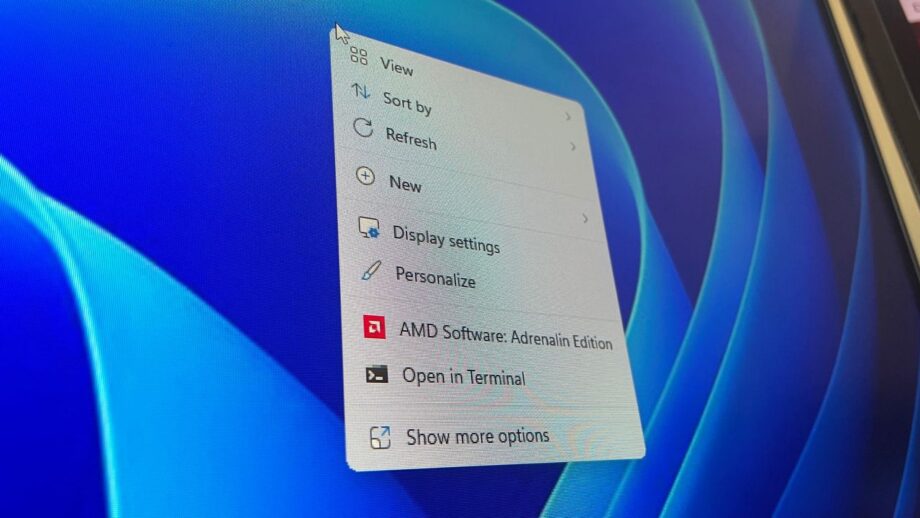
The context menu gets a major overhaul. Users can now choose to display the primary commands — Cut, Copy, Paste, Rename, Delete, and Share — directly inline instead of as a row of icons, and they can move the Properties option to the bottom for easier access. Microsoft notes that the menu will appear faster, reducing the delay between right‑clicking and having the menu ready for use. A “Customize Menu” shortcut at the bottom of the new menu lets users adjust the layout to match their habits or muscle memory.

These changes reflect Microsoft’s commitment to making core Windows 11 components efficient, functional, and easy to use. By addressing long‑standing frustrations, the company is living up to its earlier promise to prioritize performance and usability, ensuring that Windows 11 becomes a more pleasant platform for both casual and power users.

Share This Article
Facebook Twitter Copy Link
Leave a comment

Leave a Reply Cancel reply

Your email address will not be published. Required fields are marked *

Psychonauts: Indie Studio Keeps All Xbox Game Revenue

Psychonauts: Indie Studio Keeps All Xbox Game Revenue

Gamers Illustrated Gamers Illustrated August 21, 2026
FacebookLike
InstagramFollow
YoutubeSubscribe
TiktokFollow

Trending

Doppelganger or Human? Midnight Shift Customer Alert

Anomaly Lens: Spotting Doppelgangers In the game, each NPC can be a human or a…

August 21, 2026

How To Unlock All Build-A-Wrixel Styles In Fortnite Revealed Chapter7 Season4

Fortnite Chapter 7, Season 4, Override brings a fresh set of quests and new skins…

August 21, 2026

Overwatch Pulls Lifeweaver Without Warning

Lifeweaver Disappears from Overwatch After a grueling day of battling The Horrors, I unwind with…

August 21, 2026
Game Reviews

Super Mario Sunshine Review: In‑Depth Expert Analysis

Super Mario Sunshine Review: In‑Depth Expert Analysis

“Shades on! Mario’s debut on Cube is a historic blinder. Better than Mario 64? You betcha!” This was the opener to Michael Cooper’s effusive 10/10 review for Computer and Video…

Gamers Illustrated August 15, 2026

Your may also like!

Marvel’s Wolverine is 60fps by default and more dnew details
Videos

Marvel’s Wolverine is 60fps by default and more dnew details

Gamers Illustrated August 15, 2026
Heave Ho 2 Review: A Squared Verdict
Game Reviews

Heave Ho 2 Review: A Squared Verdict

Gamers Illustrated August 17, 2026
Wireless Headphones Promise 300‑Hour Battery, Budget Price
Gaming Hardware

Wireless Headphones Promise 300‑Hour Battery, Budget Price

Gamers Illustrated August 21, 2026
Big Walk Review: Communication, Puzzles, Laughter
Game Reviews

Big Walk Review: Communication, Puzzles, Laughter

Gamers Illustrated August 17, 2026

Welcome to Gamers Illustrated, your destination for everything happening in the world of gaming. From the latest gaming news and honest game reviews to industry updates, trending stories, and gaming entertainment, we bring together the stories that matter most to players and gaming enthusiasts.

Quick Links

  • About Us
  • Contact Us
  • Terms & Conditions
  • Privacy Policy

Categories

  • Entertainment
  • Features
  • Game Reviews
  • Gaming Hardware
  • Gaming News
  • Guides & Tips
  • Industry News
  • Opinions
  • Trending
  • Videos

Our Newsletter

Subscribe Us To Receive Our Latest News Directly In Your Inbox!!

We don’t spam! Read our privacy policy for more info.

Check your inbox or spam folder to confirm your subscription.

© Copyright 2026. All Rights Reserved By Gamers Illustrated.
Welcome Back!

Sign in to your account

Register Lost your password?