
By using this site, you agree to the Privacy Policy and Terms of Use.
Accept
Gamers Illustrated
  • Home
  • Gaming News
  • Game Reviews
  • Industry News
  • More
    • Opinions
    • Gaming Hardware
    • Trending
    • Guides & Tips
    • Entertainment
    • Features
    • Videos
Reading: World of Warcraft: Eternal Great Outdoors Walkthrough
Font ResizerAa
Gamers IllustratedGamers Illustrated
  • Entertainment
  • Features
  • Game Reviews
  • Gaming Hardware
  • Gaming News
  • Guides & Tips
  • Industry News
  • Opinions
  • Trending
  • Videos
Search
  • Home
  • Gaming News
  • Game Reviews
  • Industry News
  • More
    • Opinions
    • Gaming Hardware
    • Trending
    • Guides & Tips
    • Entertainment
    • Features
    • Videos
How To Beat Flame Lion Dance Grandmaster In Phantom Blade Zero

How To Beat Flame Lion Dance Grandmaster In Phantom Blade Zero

Gamers Illustrated Gamers Illustrated October 29, 2026
  • About Us
  • Contact Us
  • Terms & Conditions
  • Privacy Policy
© Copyright 2026. All Rights Reserved By Gamers Illustrated.
Gamers Illustrated > Blog > Trending > World of Warcraft: Eternal Great Outdoors Walkthrough
Trending

World of Warcraft: Eternal Great Outdoors Walkthrough

Gamers Illustrated
Last updated: November 17, 2026 7:16 am
By Gamers Illustrated 2 Min Read
Share
World of Warcraft: Eternal Great Outdoors Walkthrough
SHARE

How To Complete The Great Outdoors

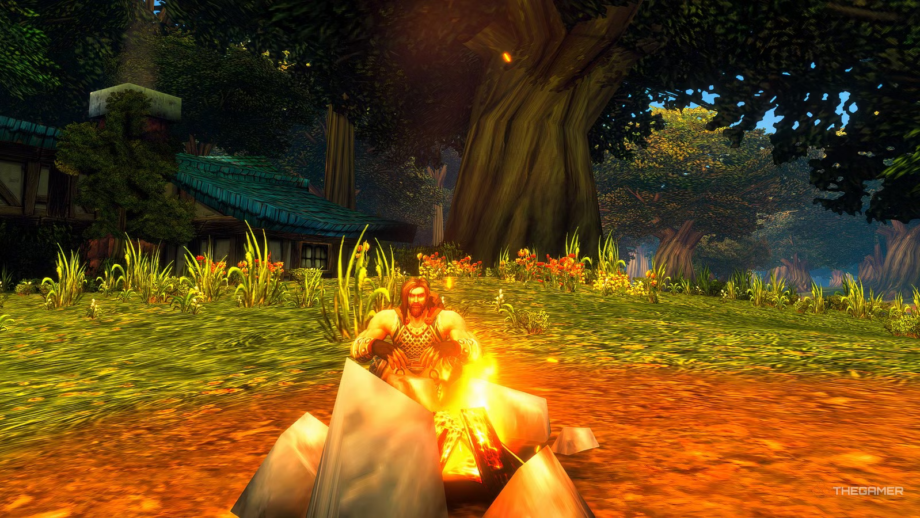
You can start The Great Outdoors early in your adventure, regardless of your race. The quest giver and location vary by starting area, but the objectives stay the same. Follow these steps:

  1. Accept The Great Outdoors from the camping instructor.
  2. Stand beside the Basic Campfire next to the quest giver.
  3. Press X to sit, or type /sit in the chat window.
  4. Remain seated for 60 seconds to receive the Boosted Rest buff.
  5. Return to the quest giver to finish the quest.

While you rest, the Welcoming Campfire effect counts down. When the timer ends, you’ll get Boosted Rest and complete the main objective.

What To Do If The Great Outdoors Is Bugged

Sometimes the “Sit near campfire” objective doesn’t register even when you’re beside the correct fire. To fix this, press X to sit next to the fire, then type /sit in the chat while already seated. Check the Welcoming Campfire icon in the top‑right corner to confirm the buff triggered.

After completing the quest, you’ll unlock additional camping quests that teach you about professions such as mining, cooking, and herbalism. These professions let you craft items that provide useful buffs when added to a camp. The camping system becomes more valuable as you level, so use the bonuses and enjoy meeting friends along the way.
Share This Article
Facebook Twitter Copy Link
Leave a comment

Leave a Reply Cancel reply

Your email address will not be published. Required fields are marked *

GTA 6 Driving Mastery Outshines All Competitors

GTA 6 Driving Mastery Outshines All Competitors

Gamers Illustrated Gamers Illustrated November 24, 2026
FacebookLike
InstagramFollow
YoutubeSubscribe
TiktokFollow

Trending

Gaming Mouse Black Friday: Lowest Price, Lightweight, Long Battery, Premium Build

Razer Viper V4 Pro Review: Best Gaming Mouse The Razer Viper V4 Pro is the…

November 24, 2026

Trump Claims Credit, Meme Shows Jensen Huang Victorious at Nvidia

Trump says he convinced Nvidia board to reinstate Jensen Huang US President Donald Trump told…

November 24, 2026

Last Pirates: Die Together – Official Xbox Game Preview Launch Trailer

Get a fresh look at pirate mayhem in this latest trailer for Last Pirates: Die…

November 24, 2026
Opinions

Metal Gear Solid Mod Enables Co‑Op Gameplay, Revives Classic Stealth Action

Metal Gear Solid Mod Enables Co‑Op Gameplay, Revives Classic Stealth Action

You'll Still Have To Play MGS With A Friend The original Metal Gear Solid remains one of the most iconic stealth games ever made, a title that turned the series…

Gamers Illustrated August 20, 2026

Your may also like!

Nioh 3 Hell Rising Review: Global Gaming Milestone
Features

Nioh 3 Hell Rising Review: Global Gaming Milestone

Gamers Illustrated August 25, 2026
79% Claim Razer’s New Gaming Mouse Feature Cheats
Gaming Hardware

79% Claim Razer’s New Gaming Mouse Feature Cheats

Gamers Illustrated October 18, 2026
PS Plus Catalog November 2026 Adds Death Stranding 2
Guides & Tips

PS Plus Catalog November 2026 Adds Death Stranding 2

Gamers Illustrated November 11, 2026
How To Play With Friends In Escape Academy 2 Back2School
Guides & Tips

How To Play With Friends In Escape Academy 2 Back2School

Gamers Illustrated November 6, 2026

Welcome to Gamers Illustrated, your destination for everything happening in the world of gaming. From the latest gaming news and honest game reviews to industry updates, trending stories, and gaming entertainment, we bring together the stories that matter most to players and gaming enthusiasts.

Quick Links

  • About Us
  • Contact Us
  • Terms & Conditions
  • Privacy Policy

Categories

  • Entertainment
  • Features
  • Game Reviews
  • Gaming Hardware
  • Gaming News
  • Guides & Tips
  • Industry News
  • Opinions
  • Trending
  • Videos

Our Newsletter

Subscribe Us To Receive Our Latest News Directly In Your Inbox!!

We don’t spam! Read our privacy policy for more info.

Check your inbox or spam folder to confirm your subscription.

© Copyright 2026. All Rights Reserved By Gamers Illustrated.
Welcome Back!

Sign in to your account

Register Lost your password?