


Reviving 3D Video with Frame Depth
Do you remember the 3D trend? The Nintendo 3DS, 3D TV, and 3D cinema were once hailed as the next big thing, promising a more immersive viewing experience. Yet the excitement faded, and the technology never became mainstream.
Now a small GitHub project called Frame Depth revives that interest by turning ordinary videos into slightly more three‑dimensional ones using Steam Frame. The extension, created by user guix8, works as a Chrome plugin that adds a stereoscopic 3D effect to any video played in the browser.
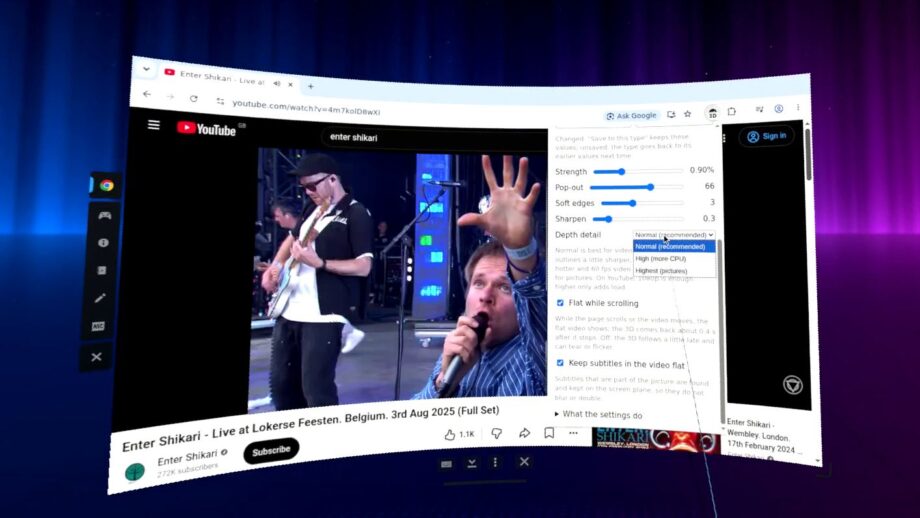
Once enabled, the effect runs automatically, giving a modest but noticeable depth to concerts, food challenges, and other YouTube content. While it doesn’t make you feel like you’re actually in the crowd, it does add an extra layer of immersion that makes the viewing experience a bit more engaging.
Installation is a bit more involved than typical Chrome extensions. First, you need Steam Frame in developer mode and Chrome installed via Flathub on the SteamOS desktop (flatpak install com.google.Chrome). Then download the Frame Depth package from GitHub and run the terminal commands:
cd ~/Downloads && f=$(ls -v frame Depth-*-steamos-arm64.tar.gz | tail -1) && echo “$f” # the most recent download
sha256sum -c “$f.sha256” && tar -xzf “$f” && cd “${f%.tar.gz}”
bash install.sh # ~/.local/share/frame Depth, user service, extension files
Finally, it must be loaded as an extension in Chrome, which also requires developer mode for extensions to be enabled in the browser. Once installed, you can enable the 3D effect and change settings from a drop‑down menu right there in Chrome. The maximum pop‑up slider seems to have the biggest impact on the 3D effect; the equivalent of turning the 3DS slider all the way up.
If you own a Steam Frame, give Frame Depth a try. It’s a fun way to rekindle enthusiasm for 3D technology that once seemed destined to dominate but ultimately stalled. All our current recommendations point to this modest yet promising tool.